Using this board in your own project
The four places your code can run (your PC, the board, the kernel, the FPGA),
what each costs, and the commands that start each one. Most projects want the
first. To choose, see choose where your code runs;
to start on the PC, talk to the board from Python.
New to the board? Get it talking with the README and come back
when ./devkit selftest --ssh passes.
The four places your code can live
| Where it runs | What it costs you | Rebuild loop | Reach for it when | |
|---|---|---|---|---|
| 1. Host | your PC, over Ethernet or USB | nothing — a venv, pip install, and go |
seconds | almost always |
| 2. On the board | the board's two ARM cores | an ssh session | seconds | you need the board standalone, or the data is too big to ship |
| 3. In the kernel | the board's Linux | a kernel build and a patch to maintain | 2m46s from clean, 6 s to flash | you need a new sysfs knob, or per-sample timing |
| 4. In the FPGA | the PL fabric | Vivado, and HDL | 20 min with --hdl-only, 70 from cold |
the data rate is too high for anything above |
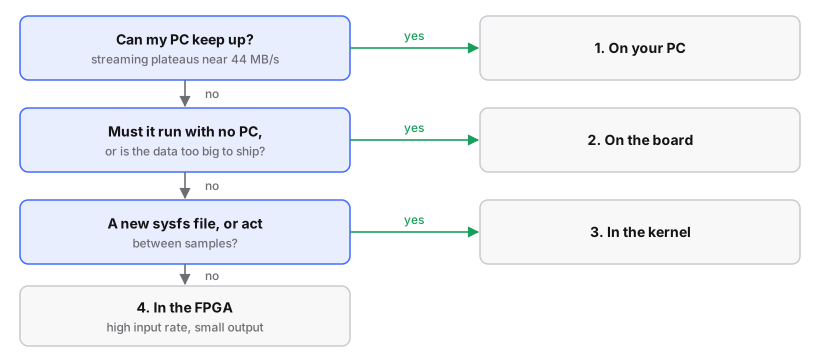
Ask in order and stop at the first yes:
| Question | If yes | The numbers |
|---|---|---|
| Can my PC keep up? | place 1 | One channel at the full 61.44 MS/s is 245.8 MB/s; streaming over gigabit Ethernet plateaus near 44 MB/s (measurements). Under that: place 1 |
| Must it run with no PC, or is the data too big to ship? | place 2, on the Debian root | On the board, capture reaches 220.0 MB/s (one channel) and 430.8 MB/s (two) |
| Do I need a new sysfs file, or to act between samples? | place 3 | |
| Is the input rate higher than the bus can carry, with a small output? | place 4 |
A burst is different from a stream: one libiio buffer fills at the converter's rate and ships afterwards. A 33 554 432-sample (128 MB) buffer of two channels at 30.72 MS/s completes cleanly, with 891 MB of 1001 free during the run; 128 MB is about 0.55 s at 245.8 MB/s.
Before any of them
Rule out a damaged board with ./devkit selftest --ssh (rails, die
temperatures, the digital interface eye, the receiver).
If the project transmits
Read transmitter safety first: the board reaches about +19 dBm, its receive input is rated +2.5 dBm absolute maximum, and a loopback without at least 20 dB of attenuation destroys the receiver.
1. On your PC — start here
The board's iiod daemon serves the radio over the network; anything speaking
libiio can drive it, from any language.
The install (a venv and pyadi-iio) and a six-line receive example:
talk to the board from Python.
Call rx_destroy_buffer() (or tx_destroy_buffer()) before the script ends
- symptom: the script segfaults on exit (code 139) inside
iio_buffer_destroy(): the data is fine, but the crash fails tests and CI - cause: Python frees objects in no guaranteed order at shutdown, and the buffer (the memory libiio streams into) can outlive its connection. Both pip
pylibiio0.25 and Debian'spython3-libiio0.23 do this - fix: call it; calling it with no buffer is harmless
Transmit: never write the −89.75 dB floor before a stream
Both channels at exactly maximum attenuation is how the driver recognises
"muted", so starting a buffer then restores the cached gain and you come out
louder than asked. A non-floor gain set before the buffer is kept (patch
0005). To be silent during a stream, mute after it starts and read the
value back; the tools here set gain after tx() and assert the read-back.
2. On the board — when it has to be standalone
A dual-core Cortex-A9 with 1 GB of DDR running Linux. For development, use
firmware-modern/ (Debian):
firmware/ (Buildroot) |
firmware-modern/ (Debian) |
|
|---|---|---|
| installing a package | rebuild the whole image | apt install python3-numpy |
| your script survives a reboot | only in /mnt/jffs2 |
yes, it is a real disk |
| Python | a minimal build | the whole of Debian's |
| logs | RAM, gone at reboot | journalctl, persistent |
# run from: the board (Debian)
# python3-libiio is NOT installed by default - the image ships iiod and the
# libiio-utils command-line tools, but not the Python binding. It is 67 kB.
apt update && apt install -y python3-libiio python3-numpy python3-scipy
cat > /usr/local/bin/my-thing <<'EOF'
#!/usr/bin/env python3
import iio
ctx = iio.Context("local:")         # "local:" - no network in the way
print(ctx.devices)
EOF
chmod +x /usr/local/bin/my-thing
Use local: rather than ip: on the board
It skips the network stack, which is the difference between ~430 MB/s and ~44 MB/s.
To start at boot, write a systemd unit and commit it to
firmware-modern/debian/overlay/etc/systemd/system/ (copy a fishball-*.service
there).
| Trap | |
|---|---|
| an ordering cycle | makes systemd delete the unit, so systemctl status says it does not exist; systemd-analyze verify finds it |
After= |
is not "ready": wait for the actual file your unit needs |
3. In the kernel — a new knob, or per-sample timing
For acting between samples or exposing something as a file. The transmitter-safety patches here are this shape (a timer that mutes when DMA stops, a latch, a temperature ceiling), 37 to 221 added lines each.
# run from: the repo root
./firmware-modern/setup.sh                   # once - fetches ADI's 6.12 tree
# run from: firmware-modern/src/linux
$EDITOR drivers/iio/adc/ad9361.c
make ARCH=arm CROSS_COMPILE=arm-linux-gnueabihf- uImage LOADADDR=0x8000 -j$(nproc)
cp arch/arm/boot/uImage ../../output/
# run from: the repo root
./devkit flash --kernel-only
Flashing takes about six seconds, and the previous kernel stays on the card as
uImage.prev for rollback. Step by step: change a kernel driver.
- Then fold the change into a numbered patch in
firmware-modern/patches/, or the next cleansetup.shloses it, and add a CI assertion so it cannot silently stop applying. - See the kernel page and
firmware/patches/README.md.
Never keep safety state in struct ad9361_rf_phy_state
ad9361_clear_state() memsets it on a debugfs initialize. Use struct ad9361_rf_phy.
4. In the FPGA — when the rate is too high for anything else
For a huge input rate and a small output: a correlator, a decimating filter, a packet detector, a timestamper. The course Fabric School teaches Verilog and this design from nothing. Two worked examples, readable as diffs:
firmware/patches/optional/0003: a frequency shifter and a repointed filter make RX0 an FM channelizer (write-up)firmware/patches/0006: four bits of every transmit sample to header pins, sample-locked (write-up)
# run from: firmware/
$EDITOR src/hdl/library/my_block/my_block.v
./sim/run_sim.sh                             # ~1 second, against a golden model
rm -rf src/hdl/projects/pluto/pluto.{xpr,cache,gen,hw,ip_user_files,runs,sim,srcs,sdk}
./scripts/build_all.sh --hdl-only            # ~20 minutes (70 from cold)
./scripts/verify_output.sh                   # before you flash, not after
cd .. && ./devkit flash --target factory --boot-only
| Rule | Why |
|---|---|
| Simulate first | one second, and synthesis cannot tell you the logic is wrong |
| Delete the Vivado project before any HDL or block-design change | or build_hdl.tcl reuses pluto.xpr and you flash the old bitstream |
| Never change the bitstream and the kernel in the same step |
Step by step: add your own logic to the FPGA.
When it goes wrong
Troubleshooting is organised by symptom. The common three:
| Symptom | Usually |
|---|---|
| the board behaves unlike its firmware | a script in /mnt/jffs2 — on Buildroot; check it first, and note nothing runs it on Debian |
| your HDL change did nothing | the Vivado project was reused; delete it and rebuild |
| transmit is silent | in order of likelihood: no gain was ever set (0011 boots at −89.75 dB); the stream starved for 250 ms and 0015 muted it; tx_disable is latched; tx_temp_limit is armed below the die temperature. ./devkit temps shows the last two |
Further reading
- capturing IQ and other SDR tools
examples/: GNU Radio flowgraphs- the block design · the pins · the hardware · building without Vivado