Connect and find the board
Two USB cables and about a minute, then the board answers at 192.168.2.1
or fishball.local.
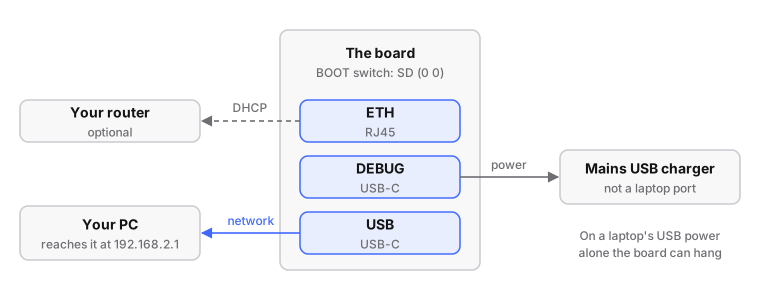
- With the board unpowered, put the card in.
- Check the
BOOTDIP switch next toRST: both sliders away fromON(SD mode). Boards ship like that. - Connect both USB-C sockets: one to a mains USB charger, the other to your PC.
- Wait about a minute.
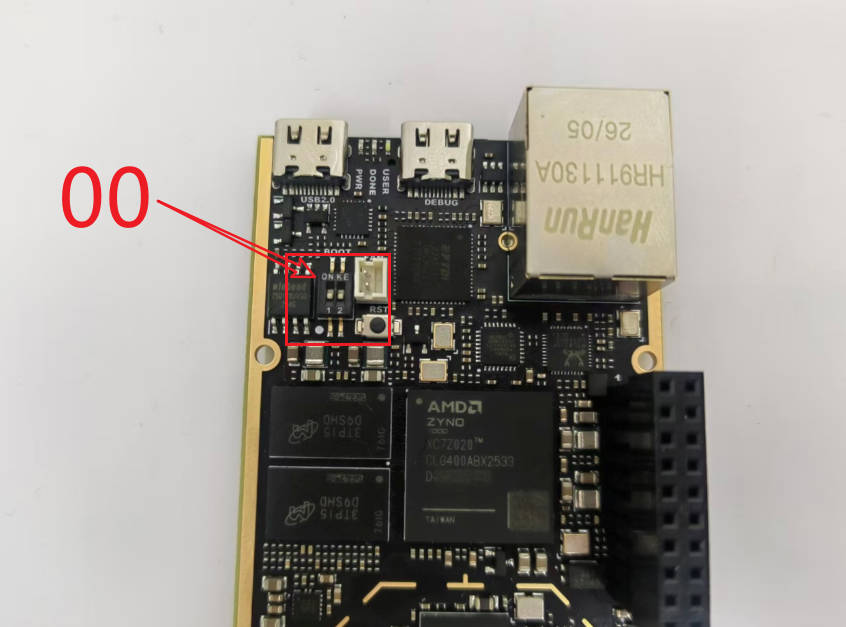
Step 2: the BOOT switch in SD mode, both sliders away from ON.
Then reach it:
| Route | Address |
|---|---|
| The USB cable (always works, the way back in) | 192.168.2.1 |
| By name (mDNS, over Ethernet or USB) | fishball.local |
| Ethernet | your router hands it an address (DHCP) |
# run from: your HOST
ssh root@192.168.2.1        # password: analog
iio_info -s                 # address, model and serial, [ip:fishball.local]
From a clone of the repository, ./devkit net find locates it without knowing
the address.
You should see: a login prompt over ssh, and iio_info -s listing the board.
SDR software reaches it at ip:fishball.local or ip:192.168.2.1.
Nothing answers?
- Give it a full minute.
- Check the
BOOTswitch and the mains charger. - Unplug and replug the USB cable to your PC.
- Then see troubleshooting and the networking reference.
Next: check what it runs.