Building in a container
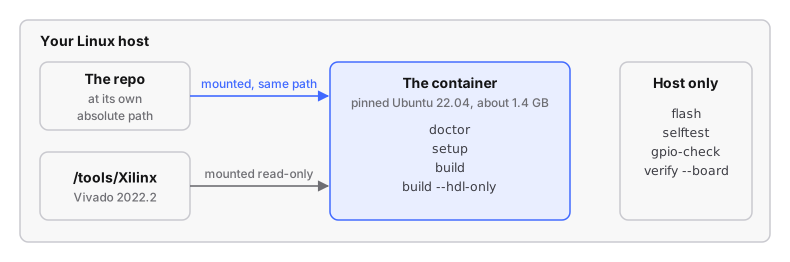
This is the recommended way to build this firmware. Vivado 2022.2 runs only
on Ubuntu 18.04–22.04; ./devkit container runs the build (and the Vivado
installer) in a pinned Ubuntu 22.04 container (an isolated userspace on your
own kernel), so your host distribution does not matter. Vivado 2022.2 is pinned
here because a toolchain change changes the bitstream. The steps are in
build with Vivado in a container; this page is
the detail.
Steps
# run from: the repo root
./devkit container build-image                       # once, ~3 min
./devkit container doctor --target factory           # the same checks as ./devkit doctor, inside
./devkit container setup --target factory            # clone upstream source + apply patches   (~5 min)
./devkit container build --target factory            # everything                           (45-90 min)

# after that first full build, the fast loop for an HDL change:
./devkit container build --target factory --hdl-only #                                       (~20 min)
No Vivado yet? Install it first. Build in the
container; flash from the host: flash, selftest, gpio-check and
verify --board are host commands.
Installing Vivado in the first place
The steps are in install Vivado 2022.2:
./devkit container install <installer>.
| why in the container | on a host too new for Vivado, its installer (the same Java/GTK application) will not run either, so it runs in the container too, writing to the host |
| the mount | /tools/Xilinx read-write (the only time it is not read-only), and the installer's GUI |
| answers | as in building.md: Vivado, only Zynq-7000 under device families (~130 GB down to ~30 GB), path /tools/Xilinx |
| time | the web installer needs your AMD account and downloads the content itself; budget an hour |
| Symptom | Cause | Fix |
|---|---|---|
| "Extraction failed." / "Signal caught, cleaning up" from the installer | usually false: it exits with status 143 after extracting all 720 MB | none needed: the install step checks for an executable xsetup instead of the exit status |
| the same, and real | unpacking onto a read-only directory, or onto rootless podman's overlay filesystem (mounted userxattr) |
the work directory is a bind mount |
Same output as a host build
The container and a host build produce identical files when the host has the
same compilers (Ubuntu 22.04: gcc-arm-none-eabi 10.3, gcc-arm-linux-gnueabi
11.4). With other versions (on Arch, arm-none-eabi-gcc 16.2 and Arm's GCC
15.2) the FSBL, U-Boot and kernel bytes differ while the bitstream and device
tree stay identical. To check, build once each way and compare md5sum
firmware/output/*.
rebuilt by --hdl-only? |
host vs container | |
|---|---|---|
BOOT.bin |
yes: synthesis, implementation, FSBL, bootgen |
identical |
uramdisk.image.gz |
yes: mkimage re-wraps it every build |
identical |
uImage, devicetree.dtb, uEnv.txt |
no, reused from the full build | identical |
- The current default design's
BOOT.binis3fb710d8f990cec8f14d5ca61ca2ddb7from the host, the container, and a container whose Vivado was installed by./devkit container install(DSP48s 94/220, Slice LUTs 12521, WNS 0.215 ns). From a fresh clone with the Vivado project deleted, the channel-0-only design (STOCK_RX_FILTER=1) givesb2de45be…both ways. - All five SD-card files are reproducible:
build_all.shsetsSOURCE_DATE_EPOCHto the root filesystem's modification time somkimage's header timestamp is stable. An externally setSOURCE_DATE_EPOCHwins.
What is and is not in the image
- Vivado is not in the image.
/tools/Xilinxis bind-mounted read-only, so the image is about 1.4 GB. It pins glibc, the X libraries (GTK2 for Vivado's GUI), the packagesdoctor.shchecks for, andgcc-arm-none-eabiwithlibnewlib-arm-none-eabi. No Vitis, Xvfb, GTK3, WebKit or SWT. - The repo is mounted at its own absolute path, not
/work: Vivado stores absolute paths inpluto.xpr, so host and container projects are interchangeable only if the path matches. - Output files are owned by you (rootless podman maps root to you; Docker is
passed
--user). - Reaching the board: TCP to
iiod(30431) and ssh (22) work, but the image cannot resolve mDNS names likefishball.local(names the board announces itself, with no DNS server).tools/container/run.shresolves the name on the host and passes it in asBOARDplus--add-host; aBOARDyou set is forwarded untouched. There is noping;doctorandstatususetools/board_addr.py --check, which makes each service identify itself.
Vivado dies in synthesis with a heap error
tcmalloc: large alloc 115875935977472 bytes == (nil)
realloc(): invalid pointer
Abnormal program termination (6)
| symptom | the lines above; on Ubuntu 20.04 it shows as a SIGSEGV in malloc_usable_size instead |
| cause | Vivado's licence manager (libXil_lmgr11.so) dlopens libudev.so.1 to fingerprint the host, after Vivado's bundled tcmalloc has replaced malloc process-wide, while libudev frees through glibc |
fix (already applied by ./devkit container) |
tools/container/udev-stub.c answers that enumeration with an empty list, so the allocators never meet. Synthesis and the bitstream are untouched; the XC7Z020 needs no licence |
| what does not fix it | mounting /run/udev, config_webtalk -user off, a 20.04 base. Do not switch off glibc's heap checker instead |
Why 22.04 and not 20.04: both are supported
(UG973),
the crash above happens on both, and tools/legacy-libs/ was extracted on
22.04 (its copies need GLIBC_2.33 and cannot load on 20.04).
Other operating systems
Only Linux hosts are tested. Flashing never needs the container.
| Any Linux | Yes, the tested case. |
| Windows | Very likely, through WSL2. Simpler: run the devkit directly in WSL2 Ubuntu, with WSLg for the GUI. Keep the checkout inside the WSL2 filesystem, never on /mnt/c/ (slow, and Vivado's project files need case sensitivity and POSIX permissions). Reaching the board may need mirrored networking. |
| macOS, Intel | Plausible: the Linux VM is x86-64. Needs XQuartz for the GUI and 44 GB in the VM. |
| macOS, Apple Silicon | Realistically no: the VM is ARM64 and Vivado is x86-64 only, and it is the kind of software that breaks under Rosetta translation. |