Control the USER LED
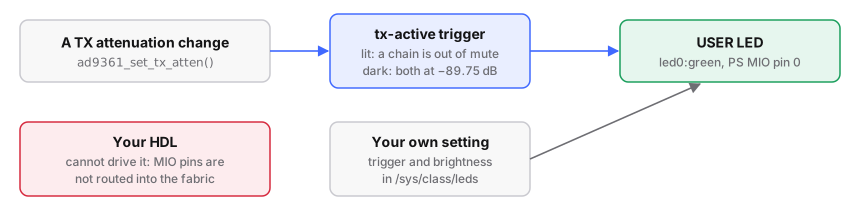
On these builds the USER LED follows the transmitter: lit whenever either
transmit chain is out of full attenuation, dark when both sit at the −89.75 dB
mute floor. The factory firmware blinks a heartbeat instead.
Drive it yourself
A trigger is a kernel rule that drives an LED automatically. Set it to none
first, or the kernel keeps overwriting your value:
# run from: the board
cd /sys/class/leds/led0:green      # or whatever `ls /sys/class/leds/` shows
echo none > trigger
echo 1 > brightness                # on; 0 for off
cat trigger                        # the available triggers; the current one in [brackets]
echo timer > trigger               # blink at your own rate:
echo 100 > delay_on                #   milliseconds lit
echo 900 > delay_off               #   milliseconds dark
echo mmc0 > trigger                # flash on SD-card activity
Others include heartbeat, oneshot and default-on. From a program, write
1 or 0 to the same brightness file.
To keep the heartbeat instead of tx-active, set a U-Boot variable and reboot:
# run from: the board (Buildroot or Debian)
fw_setenv tx_led 0
| What it shows by default | LED |
|---|---|
| both channels muted, no buffer | dark |
| TX1, TX2 or both raised, no buffer | lit |
| gain set, then a DMA stream running | lit |
| DMA stream running, both channels still muted | dark |
| Good to know | |
|---|---|
| a setting made on the board | vanishes at reboot on Buildroot; on Debian run it at boot from a systemd unit (/mnt/jffs2/autorun.sh is not run there) |
| your HDL cannot drive this LED | it is on PS MIO pin 0, not routed into the programmable logic |
| an LED your FPGA logic drives | use a free JP5 pin, with a resistor to ground (wire to JP5) |
Make your setting the default at boot
Choose the trigger from userspace at boot, not by editing the device tree (why).
# run from: the board at boot - add to firmware/src/buildroot/board/pluto/S21misc, inside the start case
echo timer > /sys/class/leds/led0:green/trigger
# firmware-modern/: new file firmware-modern/debian/overlay/etc/systemd/system/my-led.service
[Unit]
Description=Pick a USER LED trigger
After=iiod.service
[Service]
Type=oneshot
ExecStart=/bin/sh -c 'echo timer > /sys/class/leds/led0:green/trigger'
RemainAfterExit=yes
[Install]
WantedBy=multi-user.target
On Debian, commit the unit to firmware-modern/debian/overlay/. On Buildroot,
capture the S21misc edit as a patch numbered after the highest in
firmware/patches/ (currently 0021, so 0022), diffed against a pristine
copy (the file as the existing patches leave it), since patches 0001, 0004
and 0012 already touch it:
# run from: firmware/src
diff -u <pristine copy of S21misc> buildroot/board/pluto/S21misc \
    > ../patches/0022-my-led-default.patch
Reference: the USER LED: wiring, the tx-active
trigger, an LED driven from the fabric.