Building your own firmware
The factory build on an Ubuntu 18.04, 20.04 or 22.04 host (the releases Vivado 2022.2 runs on): its requirements, commands, stages and layout. It produces the five SD-card files that contain your change.
| To | See |
|---|---|
| check this machine | check your machine can build |
build on any other Linux (the recommended route; it installs Vivado for you and produces a byte-identical BOOT.bin) |
build with Vivado in a container · reference |
| build without Vivado | build without Vivado |
| add your own logic | add your own logic to the FPGA |
| put the result on the board | put it on the board · flashing reference |


Requirements
| Hardware | Needed for |
|---|---|
| the board, a USB-C cable | everything |
| a microSD card with a reader | a board that no longer boots; one that still boots can be reflashed over the network (Option C) |
| an SMA attenuator of at least 20 dB | any loop from TX to RX |
| a debug-port cable | the serial console or JTAG only |
Software (Ubuntu 22.04; on anything else, use the container):
# run from: anywhere, on your host
sudo apt update
sudo apt install -y git build-essential bison flex libssl-dev \
    device-tree-compiler u-boot-tools screen python3 \
    libgmp-dev libmpc-dev libmpfr-dev sshpass iverilog libiio-utils \
    gcc-arm-none-eabi libnewlib-arm-none-eabi gcc-arm-linux-gnueabi
| Package | Why |
|---|---|
gcc-arm-linux-gnueabi |
the cross-compiler (runs on your PC, produces code for the board's ARM cores) for U-Boot and the kernel. The hard-float arm-linux-gnueabihf-gcc also works (U-Boot is then built with -mfloat-abi=soft), but only gnueabi rebuilds the factory kernel byte for byte. Buildroot brings its own compiler for the userspace. |
gcc-arm-none-eabi, libnewlib-arm-none-eabi |
the bare-metal compiler and C library for the boot loader. Without newlib's hard-float variant the link fails with uses VFP register arguments. |
libgmp-dev, libmpc-dev, libmpfr-dev |
the kernel's GCC-plugin build; without them stage 4 fails with fatal error: gmp.h |
sshpass |
./devkit flash, verify --board and gpio-check use it to reach the board |
iverilog |
HDL simulation |
libiio-utils |
iio_attr and iio_info |
screen |
the serial console only |
- GCC 11 on 22.04 builds everything. On GCC 14 or later
build_all.shalso needsgcc-13for one legacy Buildroot host tool, and picks it itself. - No display is needed.
./devkit doctor --target factorychecks all of this.
An ARM cross-compiler on Arch
Arch has no ARM Linux cross-compiler in its official repositories. Use Arm's
prebuilt toolchain (no root): download
arm-gnu-toolchain-<version>-x86_64-arm-none-linux-gnueabihf.tar.xz and its
.sha256asc from Arm's download page,
then link its tools under the names the build looks for:
# run from: the directory holding the download
sha256sum -c arm-gnu-toolchain-*-x86_64-arm-none-linux-gnueabihf.tar.xz.sha256asc
mkdir -p ~/.local/opt ~/.local/bin
tar -xJf arm-gnu-toolchain-*-x86_64-arm-none-linux-gnueabihf.tar.xz -C ~/.local/opt
for t in ~/.local/opt/arm-gnu-toolchain-*-arm-none-linux-gnueabihf/bin/arm-none-linux-gnueabihf-*; do
    n=$(basename "$t"); ln -sf "$t" ~/.local/bin/"${n/arm-none-linux-gnueabihf-/arm-linux-gnueabihf-}"
done
arm-linux-gnueabihf-gcc --version     # ~/.local/bin must be on PATH
| version | 15.2.rel1 builds both targets |
| other toolchains | remove any other arm-linux-gnueabihf-* tools in /usr/bin (for example from a half-finished AUR install), so all tools come from one toolchain |
| the AUR route | takes hours: install arm-linux-gnueabihf-gcc-stage1, -glibc-headers, -gcc-stage2, -glibc, then arm-linux-gnueabihf-gcc, one yay -S at a time, in that order |
Install Vivado 2022.2
Vivado is AMD's FPGA design tool. The steps are in install Vivado 2022.2.
| size, time | about 50 GB, and 20 to 70 minutes of every build |
| licence | the Zynq-7020 is covered by the free WebPACK licence |
| not changing the FPGA design? | you do not need it: Building without Vivado |
| host newer than 22.04 | the installer will not run either; use Installing Vivado in the first place |
| what to install | the Vitis unified installer for Linux (it offers both products; this project uses only Vivado): Vivado, edition Vivado ML Standard, only Zynq-7000 under device families (~130 GB down to ~30 GB) |
| where | the default path /tools/Xilinx, which tools/env-vivado.sh points at |
Always source tools/env-vivado.sh, never Vivado's own settings64.sh
Vivado needs libtinfo.so.5, libncurses.so.5 and libssl.so.1.1, which a
default 22.04 lacks. The script prepends vendored copies to LD_LIBRARY_PATH,
only where the distribution has no libtinfo.so.5 of its own: the copies need
GLIBC_2.33, and forced onto an older release they fail with
librdi_commontasks.so: GLIBC_2.33 not found.
Get the firmware source
# run from: wherever you want the devkit to live (e.g. ~)
git clone https://github.com/matsvandamme/fishball7020-fpga-devkit.git
cd fishball7020-fpga-devkit/firmware
./scripts/setup.sh
./devkit setup --target factoryfrom the repo root does the same.- It clones the upstream source (a Zynq-7020 port of ADI's
plutosdr-fw) into the gitignoredsrc/and appliespatches/(table and rationale; read it before dropping any). - Re-run it any time for a clean slate.
./devkit …runs from the repo root; the raw scripts run fromfirmware/.
Build the firmware
# run from: firmware/
./scripts/build_all.sh               # everything, 45-90 min
./scripts/build_all.sh --hdl-only    # after a full build: FPGA only, ~20 min
./scripts/build_all.sh --xsa FILE    # no Vivado: see building-without-vivado.md
--hdl-only reuses the existing kernel, U-Boot and root filesystem (stages 3–5
are byte-identical when only the FPGA changed) and refuses to run without a
previous full build.
| Stage | What it does |
|---|---|
| 1. HDL | Synthesises and implements pluto.xpr, exports the hardware platform |
| 2. FSBL | Builds the first-stage boot loader from AMD's embeddedsw sources with gcc-arm-none-eabi |
| 3. U-Boot | Built from zynq_pluto_defconfig, patched to the real board's boot defaults |
| 4. Kernel | uImage + zynq-pluto-sdr-fishball.dtb |
| 5. Root filesystem | Buildroot, which fetches its own toolchain; auto-retries a known git-archive hash-drift issue |
6. uEnv.txt |
Generated from the just-built U-Boot's own defaults |
| 7. Packaging | bootgen, built from AMD's Apache-2.0 source, combines FSBL + bitstream + U-Boot into BOOT.bin |
Every stage runs every time; Vivado's incremental synthesis rebuilds only what
changed. Output lands in firmware/output/; check it with
./devkit verify --target factory (check the build).
Simulating your HDL first
Synthesis tells you the logic fits, not that it is right. Check it in a second
with only iverilog, then prove the tests can fail:
# run from: firmware/
./sim/run_sim.sh            # ad_fs4_ddc: 473 checks; tx_gpio_bitmap: 2092 checks
./sim/run_sim.sh --mutate   # breaks the modules ten ways; every mutant must be caught
- Modules not in
src/are taken from their patch files. - The key check is gapped valid: in 2R2T mode (two receive, two transmit
channels) the AD9361 asserts
validonly every second clock, so a counter must advance once per sample, not per clock. Getting this wrong passes a back-to-back simulation and fails on hardware. - If you add HDL, add a testbench and at least one mutant. CI runs both.
Add your own HDL
The steps, from simulation to the flashed bitstream: add your own logic to the FPGA.
| New to Verilog? | Fabric School, the course written against this board, assumes nothing: lessons 4–10 cover Verilog itself, 13–18 this block design, 19–23 adding your own IP, pins, constraints and clock-domain crossings |
| Is the FPGA the right place? | using this board in your own project |
| Every block, clock domain and what is safe to change | the stock block design |
| Worked examples | isolating one FM channel in the FPGA (a custom RX block and new FIR coefficients), and the thirty-line sample-locked GPIO outputs (module, block-design tap, pin constraint and driver attribute) |
The default build's datapath, and where custom logic goes: before or after
the FIR blocks, or on transmit channel 1's direct connection between
tx_upack and axi_ad9361.
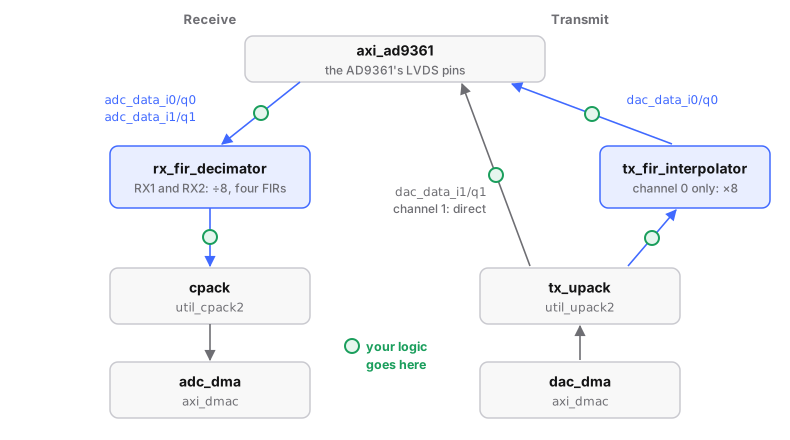
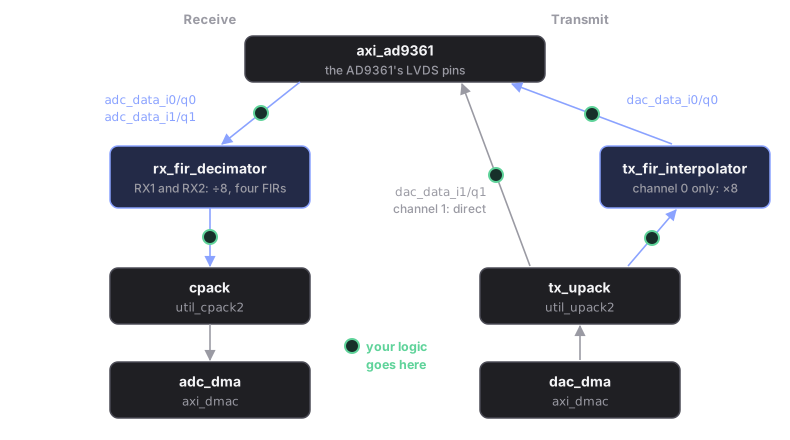
Both receive channels go through rx_fir_decimator on the default build
(patch 0021); STOCK_RX_FILTER=1 builds upstream's wiring, where receive
channel 1 skips it.
- Receive, default build. Channel 1 enters the filter on
rx_fir_decimator/data_in_2(and_3for Q) and reachescpackfromrx_fir_decimator/data_out_2/_3: insert your block on either side, mirroring thead_connectcalls patch0021adds tosystem_bd.tcl. - Receive,
STOCK_RX_FILTER=1. Channel 1 is wired straight fromaxi_ad9361tocpack. Break that connection, insert your block (mirroring thead_connect axi_ad9361/adc_data_i1 …calls insystem_bd.tcl) and reconnect tocpack'senable_2/fifo_wr_data_2(and_3for Q). - Transmit channel 1 is wired straight from
tx_upacktoaxi_ad9361on either build. - The FIR blocks (both receive channels, and transmit channel 0) are
129-tap FIRs (finite impulse response filters) that decimate and interpolate
by 8, built by
ad_add_decimation_filter/ad_add_interpolation_filterfrom Xilinx'sfir_compiler, with taps fromlibrary/util_fir_int/coefile_int.coe. The RX and TX filters share that one file. The.vfiles inutil_fir_int/andutil_fir_dec/are dead code (never packaged). - Both FIR groups run on
axi_ad9361/l_clk; match that clock domain. - GUI edits live in the regenerated
src/: to keep one, port it intosystem_bd.tcland add it topatches/.
Change the kernel
Much of the board's behaviour (what appears in /sys, when the transmitter is
muted, the serial number) lives in the Linux kernel and its ADI drivers.
Changing the kernel covers the patches, the two-minute
kernel-only loop, options, driver debugging and making a change stick; the
steps are in change a kernel driver.
This page builds firmware/, the factory reconstruction on Linux 5.15.
firmware-modern/ builds 6.12 LTS from
Analog Devices with the same transmitter-safety patches, a 228-line device-tree
overlay instead of a 1003-line flat file, and no Vivado. Use it for driver
work. A kernel swap is one file:
# run from: the repo root
./firmware-modern/setup.sh
# ...build uImage (see kernel.md), then:
./devkit flash --kernel-only
Repository layout
| Path | What |
|---|---|
devkit |
one entry point: doctor · setup · sim · build · verify · flash · … |
docs/ |
building, flashing, safety, measurements, hardware; vendor/ schematic |
.claude/skills/ |
Agent Skill for Claude Code: rules, map, healthy-board figures |
tools/ |
env-vivado.sh (source before vivado) · flash.sh · make-sd-card.sh · tx-gpio-bitmap-check.py · sample_gpio_clock.py · selftest/ · container/ (pinned build image) · legacy-libs/ (libtinfo5 etc.) |
firmware-modern/ |
Linux 6.12 and a Debian root; no HDL; boots on firmware/'s BOOT.bin |
firmware/ |
the FPGA, the factory 5.15 kernel and device tree |
firmware/patches/ |
all applied by setup.sh; optional/ holds worked examples (not applied) |
firmware/fsbl/ |
the first-stage boot loader, built without Vitis |
firmware/scripts/ |
doctor.sh · setup.sh · build_all.sh · build_hdl.tcl · import_xsa.sh · verify_output.sh · check_bootbin.py · gen_fir_coe.py · boot.bif |
firmware/sim/ |
run_sim.sh and the golden-model testbenches |
firmware/src/ |
created by setup.sh, not committed; hdl/projects/pluto/ is the Vivado project (system_bd.tcl, system_top.v, system_constr.xdc) |
firmware/output/ |
the 5 final SD-card files |
Each patch is listed and explained in
firmware/patches/README.md.