Building the firmware without installing Vivado
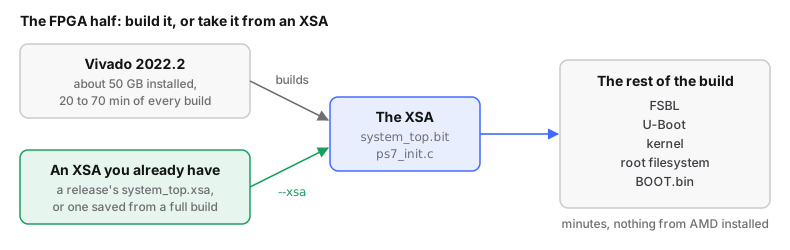
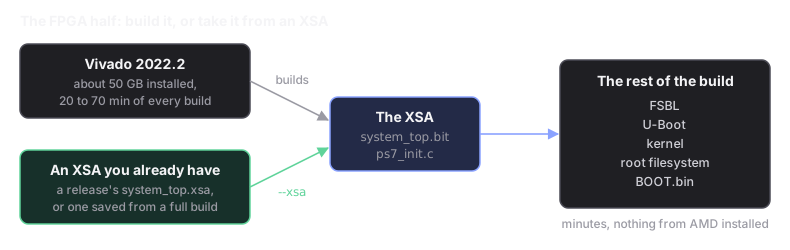
Vivado, AMD's FPGA design tool, is about 50 GB and spends 20 to 70 minutes in every build. A build that changes a driver, the kernel or the root filesystem, not the FPGA design, can skip it and install nothing from AMD: it takes the pre-built FPGA design from an XSA. The steps are in build without Vivado; this page is the detail: where to get an XSA, what you need installed, and what you give up. The full build, with Vivado: building your own firmware. What is in the bitstream: the block design.
Steps
# run from: the repo root
# factory target, with an XSA you already have:
./devkit build --target factory --xsa ~/fishball-platform.xsa

# modern target, with the pinned XSA from a published release:
./devkit build --xsa "$(./firmware-modern/fetch-pinned-xsa.sh)"
The raw script form, and repackaging only (kernel, boot loader and root filesystem already built):
# run from: firmware/
./scripts/build_all.sh --xsa ~/fishball-platform.xsa
./scripts/build_all.sh --hdl-only --xsa ~/fishball-platform.xsa
The modern target always works this way: it has no Vivado path, so --xsa
is required. Both targets import through firmware/scripts/import_xsa.sh, and
the first stage reports it:
=== [1/7] Importing a pre-built XSA (Vivado not invoked) ===
    hardware platform: .../system_top.xsa
    bitstream:         2390808 bytes
    provenance:        .../output/xsa-provenance.txt
    NOTE: this design was not implemented here, so there is no timing
          report to check. ./scripts/verify_output.sh will say so.
What an XSA is
An XSA is AMD's hardware platform export: the finished FPGA design in one
zip file (unzip -l system_top.xsa lists it). It holds system_top.bit (the
bitstream that configures the FPGA) and ps7_init.c (code that sets up the
processor's memory controller, clocks and pin multiplexing), which is all the
rest of the build needs. The FPGA half of a build takes 20–70 minutes and
rarely changes; the rest (boot loader, kernel, root filesystem, packaging)
takes minutes. An XSA skips the first half.
| Use an XSA | Why |
|---|---|
| you only change Linux | the FPGA half is unchanged |
you re-run ./devkit setup --target factory often |
it throws the Vivado project in firmware/src/ away, so the XSA is the one piece worth keeping |
| to freeze the hardware while chasing a software bug | |
| not to change the FPGA design | that needs Vivado |
To change only the kernel, see Change the kernel.
What you need installed
The FSBL (First Stage Boot Loader, the first code the ARM cores run) is
compiled from AMD's public embeddedsw
(byte-identical to xilinx_v2022.2) with a bare-metal cross-compiler, using
the board settings in the XSA's ps7_init.c; see
firmware/fsbl/README.md. bootgen, which packs
BOOT.bin, is built from AMD's Apache-2.0 source by ./devkit setup and used
always, so the output does not depend on which AMD tools you have.
| Must be installed? | Runs during the build? | |
|---|---|---|
| Vivado (~50 GB) | no, with --xsa |
no: saves 20–70 min a build |
| Vitis 2022.2 | no: nothing here uses it | no |
gcc-arm-none-eabi + libnewlib-arm-none-eabi |
yes: apt install, ~100 MB |
yes |
| AMD's embeddedsw | yes: ./devkit setup fetches ~75 MB, pinned by SHA |
yes |
| AMD's bootgen | yes: ./devkit setup fetches ~8 MB and builds it, ~5 s |
yes |
g++ + libssl-dev |
yes: to build bootgen; the kernel needs them anyway | yes |
gcc-arm-linux-gnueabi (or arm-linux-gnueabihf-gcc) |
yes: apt install; builds U-Boot and the kernel |
yes |
| Buildroot's own toolchain | only for the factory root filesystem; Buildroot fetches it itself | only in a full factory build |
./devkit doctor checks this list (with --target factory, missing Vivado is a warning); a missing
arm-none-eabi-gcc, or one without the hard-float multilib (link error "uses
VFP register arguments"), is a failure.
Where to get an XSA
Save your own. Any full build left one; copy it out before the next
./devkit setup --target factory wipes it:
# run from: the repo root
cp firmware/src/hdl/projects/pluto/system_top.xsa ~/fishball-platform.xsa
Download one from a release. For the modern target,
./firmware-modern/fetch-pinned-xsa.sh (in the steps above) fetches the
factory release named in
firmware-modern/factory-xsa.pin and
refuses it unless the sha256 matches. By hand, for either target:
# run from: anywhere, on your host. --repo is required outside a clone of this repository
gh release download v1.7 -p system_top.xsa \
  --repo matsvandamme/fishball7020-fpga-devkit
sha256sum system_top.xsa
# 47f831009eb19b21a97a8136472d663e32a32cc42a5c26ba5e17f72d4f8f7e0b
# without gh:
curl -fLO https://github.com/matsvandamme/fishball7020-fpga-devkit/releases/download/v1.7/system_top.xsa
- Use the newest factory release; v1.7 is current (XSA 851 242 B).
v1.6 is the first with an
.xsa; modern releases attach none. - A release's
.xsais that release's FPGA design. v1.6's, v1.7's and a from-source build of the current tree (with patch0021) all differ. To check whether aBOOT.bincarries a given platform's bitstream:./firmware/scripts/check_bootbin.py BOOT.bin --xsa FILE. release.ymlrefuses to publish a factory release built with--xsa, so released platforms are always built from source. A modern release accepts exactly one XSA, the pinned factory one.
Someone else's XSA is a binary you cannot read: you can check it is for the
right chip and produces the BOOT.bin you flash, but a bitstream cannot be
decompiled back into a design. Treat it like any binary from a stranger; if it
matters, build the design yourself once and keep the XSA.
Checking it worked
# run from: firmware/
./scripts/verify_output.sh
With an imported platform it reports the bitstream as imported, prints its md5
and lists the IP blocks read from the platform's own system.hwh. It cannot
check timing (implementation happened elsewhere), so it says so rather than
failing or passing:
bitstream was IMPORTED, not built here:
  bitstream md5 6bf9c28daf976ead441dff1e4bd2af9c
IP in the bitstream, from its own system.hwh (not from source):
  axi_ad9361 ... gpio_bitmap_o ... tx_upack
  -> sample-locked GPIO IS in this bitstream
timing: NOT AVAILABLE - this design was not implemented here.
output/xsa-provenance.txt records the file's origin, md5 and IP list.
Same output: an XSA exported by a Vivado run gives a byte-identical
BOOT.bin (3fb710d8f990cec8f14d5ca61ca2ddb7 both ways), also with nothing
from AMD installed (XILINX_DIR=/nonexistent, no $DISPLAY).
Importing removes this tree's timing reports. The import deletes
timing.rpt and utilization.rpt, so a stale report cannot vouch for a
bitstream it never saw. On a tree that was built from source with Vivado,
regenerate them in about a minute from the implemented design:
how.
What can go wrong
The import refuses anything it cannot vouch for, before the FSBL build would fail with a misleading error:
| If you pass | You get |
|---|---|
| Something that is not a zip | ERROR: … is not a readable zip archive. |
| An XSA exported without the bitstream | ERROR: … contains no system_top.bit. |
| An XSA for a different chip | ERROR: that XSA is not for this board's part (xc7z020clg400-2). |
| An XSA from a different Vivado version | ERROR: that XSA was written by a different tool version. |