Toggle a GPIO pin from Linux
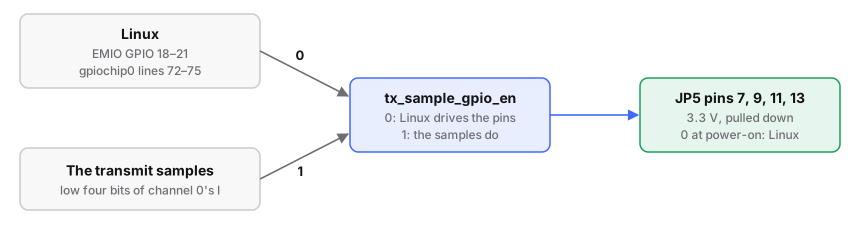
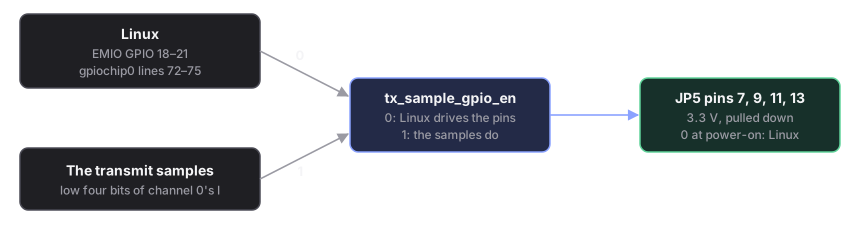
Resolve the line by name, then read or drive it. The four free pins are
sample_gpio0 to sample_gpio3 (JP5 pins 7, 9, 11, 13).
Needs libgpiod-tools: Buildroot has them; on Debian, apt install gpiod.
# run from: the board
gpiofind sample_gpio0                 # resolve by NAME, never hard-code the number
gpioget  $(gpiofind sample_gpio0)     # read
gpioset  $(gpiofind sample_gpio0)=1   # drive high
gpioset lets go the instant it exits, and the pull-down takes over, so
a following gpioget reads 0. To hold a level, use gpioset --mode=wait ...
and leave it running.
The level persists until you unexport.
# run from: the board
BASE=$(cat /sys/class/gpio/gpiochip*/base | head -1)   # 906 on 5.15, 512 on 6.12
N=$((BASE + 54 + 18))                                  # 978, or 584 on 6.12
                                                       # 54 MIO first, then EMIO 18
echo $N  > /sys/class/gpio/export
echo out > /sys/class/gpio/gpio$N/direction
echo 1   > /sys/class/gpio/gpio$N/value
echo $N  > /sys/class/gpio/unexport                    # release when done
Over ssh, in single quotes so $(...) runs on the board:
# run from: your HOST, anywhere
ssh root@192.168.2.1 'gpiofind sample_gpio0'            # -> gpiochip0 72
ssh root@192.168.2.1 'gpioget $(gpiofind sample_gpio0)'
ssh root@192.168.2.1 'gpioset $(gpiofind sample_gpio0)=1'
You should see: the pin follow two different values you drive. A single reading proves nothing: the released pull-down and a driven zero look the same.
It does not behave
Device or resource busy: the line is exported through sysfs. Unexport first; the two interfaces will not share a line.- It reads back what you wrote, whatever is on the pad: with
direction=out,valuereturns what you wrote. Setdirection=into read the pad. - It does not follow at all:
tx_sample_gpio_enmay be1, handing the pins to the transmit samples (sample-locked pins). - The sysfs number is wrong: the numbers moved between kernels (978–981 on 5.15, 584–587 on 6.12); the libgpiod lines
72–75did not.
Reference: GPIO, with the full line map.