GPIO: where the pins come from, and how to drive them
GPIO (general-purpose input/output) pins are digital lines software can read or drive. This page lists the pins that are free on this board, the three routes to them (your host, Linux on the board, your own logic in the FPGA fabric) and the full line map. For the tasks, see wire something to JP5 and toggle a GPIO pin from Linux; the feature that uses the fabric route is the sample-locked GPIO outputs.
The four free pins
| Name | Silkscreen | JP5 pin | FPGA ball | libgpiod | sysfs, 5.15 | sysfs, 6.12 |
|---|---|---|---|---|---|---|
sample_gpio0 |
3V3_IO1 |
7 | V10 | gpiochip0 72 |
978 | 584 |
sample_gpio1 |
3V3_IO2 |
9 | U9 | gpiochip0 73 |
979 | 585 |
sample_gpio2 |
3V3_IO3 |
11 | U10 | gpiochip0 74 |
980 | 586 |
sample_gpio3 |
3V3_IO4 |
13 | T9 | gpiochip0 75 |
981 | 587 |
Bank 13, 3.3 V, pulled down. Ground a probe on JP5 pin 2 or 20.
The sysfs numbers moved between kernels (controller base 906 on the vendor's
5.15, 512 on the 6.12 kernel in firmware-modern/);
the libgpiod line numbers did not. So resolve lines by name with gpiofind.
The gpio* commands come from libgpiod-tools: Buildroot has them; on Debian,
apt install gpiod. The sysfs examples need no packages.
Route one: from your host, over the network
Anything the IIO driver exposes is reachable with libiio-utils:
# run from: your HOST, anywhere
iio_attr -u ip:192.168.2.1 -d cf-ad9361-dds-core-lpc                    # list device attributes
iio_attr -u ip:192.168.2.1 -d cf-ad9361-dds-core-lpc tx_sample_gpio_en   # read
iio_attr -u ip:192.168.2.1 -d cf-ad9361-dds-core-lpc tx_sample_gpio_en 1 # write
Use -d (device attribute), not -c (channel attribute): with -c you get
iio_attr: Error : could not find channel (tx_sample_gpio_en), which reads like
the feature is missing.
The GPIO lines themselves have no libiio equivalent: use the board's tools
over ssh, in single quotes so $(...) runs on the board
(the commands).
Route two: from Linux on the board
| Interface | Holds a level? | Needs |
|---|---|---|
libgpiod: gpiofind, gpioget, gpioset |
no: gpioset lets go the instant it exits, and the pull-down takes over, so a following gpioget reads 0. To hold a level, use gpioset --mode=wait ... and leave it running |
libgpiod-tools |
sysfs: /sys/class/gpio |
yes, until you unexport | nothing |
The two interfaces will not share a line: while it is exported through sysfs,
libgpiod reports Device or resource busy. Unexport first. The commands for
both: toggle a GPIO pin from Linux.
Route three: from the fabric
Every Zynq EMIO pin is three buses, with your bitstream in the middle:
| Bus | Direction | Meaning |
|---|---|---|
GPIO_O |
PS → fabric | the value Linux wants to drive |
GPIO_T |
PS → fabric | tristate: 1 = input, 0 = drive |
GPIO_I |
fabric → PS | what Linux reads back |
To take a pin over, put a multiplexer between those buses and the pad, selected
by a register bit; to hand it back, select the EMIO side and route the pad's real
level into GPIO_I. tx_gpio_bitmap.v does exactly this,
driving the four header pins with the low nibble of every transmitted sample. Its
select bit resets to 0, so the pins are ordinary GPIO at power-on:
# run from: your HOST, anywhere
iio_attr -u ip:192.168.2.1 -d cf-ad9361-dds-core-lpc tx_sample_gpio_en 1  # fabric owns the pins
iio_attr -u ip:192.168.2.1 -d cf-ad9361-dds-core-lpc tx_sample_gpio_en 0  # Linux owns them again
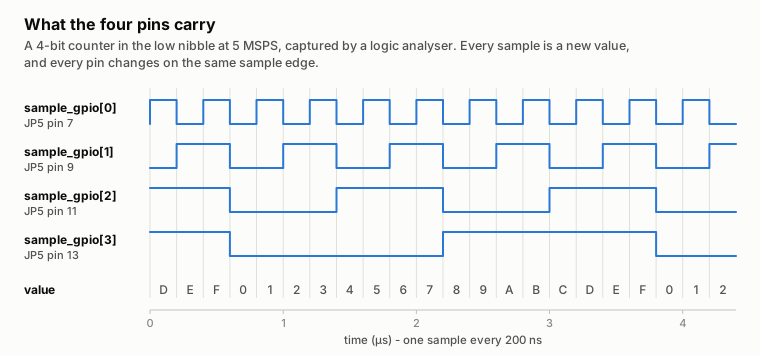
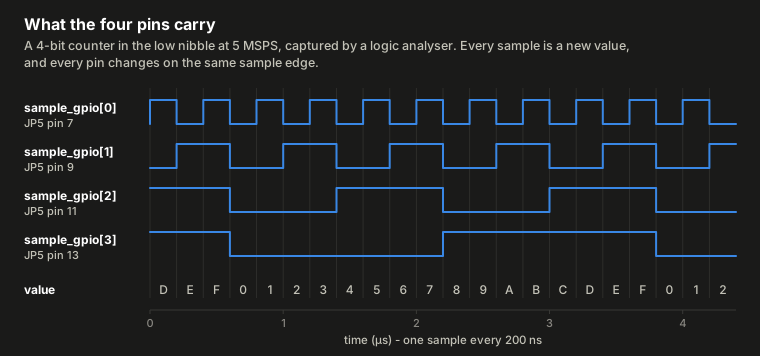
Measured with a Saleae Logic 8 on JP5 pins 7, 9, 11 and 13, transmitter muted, streaming a counter:
| Property | Result |
|---|---|
| Full rate: pin 0 toggling at 30.72 MHz from 61.44 MSPS | every sample present |
| The four pins switch together | within 1.5 ns, same-direction edges (including the analyser's own skew) |
| Both transmit channels on, the every-other-clock case | 0 errors at 5 MSPS and at 61.44 MSPS |
The pins lead the transmitted RF by a roughly constant offset of about a
microsecond, designed-for rather than measured: never treat a pin edge and its RF
as simultaneous. Raw data: img/data/saleae-bench.json,
redrawn by img/make_saleae_figures.py; full
results in the sample-locked GPIO reference.
Reference: the kinds of GPIO and the full line map
| Kind | What it is | On this board |
|---|---|---|
| PS MIO | 54 pins wired straight to the processor (PS), fixed at boot | present, but all consumed by USB, Ethernet, SD, QSPI and the UART |
| PS EMIO | up to 64 GPIO lines the processor exports into the fabric, which routes them to real pins | this is the one you use: 22 wired |
| AXI GPIO IP | a soft peripheral in the fabric, memory-mapped over AXI | not present: the design has none |
| Fabric logic | your HDL drives a pin directly, no processor involved | possible, and used by one feature |
Because the usable pins are EMIO, a bitstream change can alter what a line does,
and a tutorial that wants /dev/uioN or an AXI GPIO address does not apply.
gpiodetect reports gpiochip0 [zynq_gpio] (118 lines); only the four free
lines carry names (gpioinfo | grep -v unnamed).
| Lines | What | Usable? |
|---|---|---|
0 – 53 |
PS MIO | no: board peripherals |
54 – 67 |
EMIO 0–13, a 14-bit bidirectional bus | yes, if your carrier exposes them |
68 – 70 |
EMIO 14–16; 15 and 16 drive the AD9361's enable and txnrx |
no: leave alone |
71 |
EMIO 17 | unused |
72 – 75 |
EMIO 18–21 → JP5 pins 7, 9, 11, 13 | yes: these are the free ones |
76 – 117 |
EMIO 22–63, not wired in this design | no |
Pitfalls
- Reading back an output does not tell you what is on the pad: with
direction=out,valuereturns what you wrote. Setdirection=into read the pad. - A pin's level never says who drives it: the released pull-down and a fabric-driven zero look the same. Drive two different values and check the pin follows.
- Numbers move, names do not. Resolve IIO devices by their
namefile and GPIO lines withgpiofind, never by a hard-coded number.