Put the firmware on a card
Download the latest release and write it to the card. The modern firmware needs two partitions (boot files, then Debian), so copying files is not enough: use the writer.
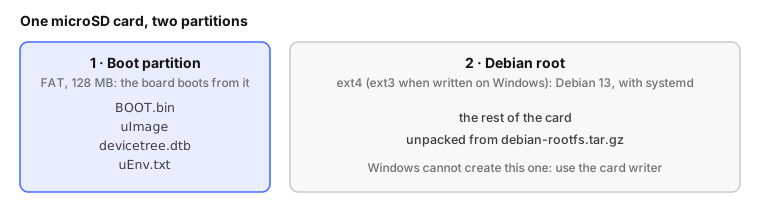
Back up every file on the board's current card first. That is your way back.
With the release files in ~/Downloads:
# run from: the repo root. DESTROYS everything on the card
./devkit write-card --dry-run /dev/sdX        # checks the device, writes nothing
sudo ./devkit write-card --from ~/Downloads /dev/sdX
It refuses non-removable disks, but check the device name yourself.
Put write-card.cmd from the release next to its other six files and
double-click it. Nothing to install. Step by step, with every prompt:
write the card on Windows.
One FAT32 partition: copy the five files of v1.7 onto the card.
You should see: the writer ends with its own check passing (on Windows,
OK: all ... read back identical).
Never update this board with DFU
It has bricked units of this board. Changing firmware always means rewriting
the card, or ./devkit flash on a running board (flashing reference).
Next: connect and find the board.