Reaching the board and changing its IP address
Every route to the board, every address setting, and where the settings are stored, which decides what survives a reboot or a reflash. For the tasks, see connect and find the board, change the IP address or name and log in with a key.
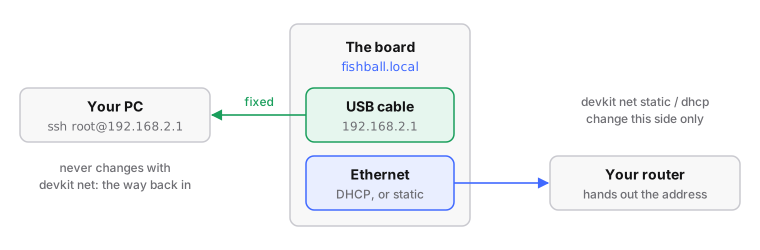
- USB cable: 192.168.2.1, always: the way back in
- Ethernet: asks your router (DHCP) by default
- Name:
fishball.local(mDNS) - Settings live in: Buildroot: the U-Boot environment in QSPI flash, so they survive reflashing the SD card. Debian:
/etc/network/interfaces, an ordinary file - Security: no packet filter,
iiod(port 30431) has no authentication: anyone on your LAN can tune, receive and transmit
| Term | Meaning |
|---|---|
| DHCP | a router handing out addresses automatically |
| static address | one you fix yourself |
| default route (gateway) | where a device sends traffic for other networks; without one it reaches only its neighbours |
| mDNS | lets a device answer to name.local without a DNS server |
| U-Boot | the small program that loads Linux |
The short version
# run from: the repo root
./devkit net                          # what is it doing now?
./devkit net find                     # locate it without knowing the address
./devkit net dhcp                     # ask the router for an address (the default)
./devkit net static 192.168.1.50      # pin it to one address; an optional second argument is the netmask
./devkit net name mysdr               # change the name it answers to (mysdr.local)
dhcpandstaticwrite the setting, read it back before rebooting, then find the board again by name, since switching discards the address you were on.- On the Debian rootfs,
dhcp,staticandnamerefuse and print the equivalent command instead;findand the status display work on both.
Which userspace is your board running?
Most of this page describes the Buildroot rootfs
On the Debian rootfs from firmware-modern/debian
the U-Boot variables, S40network, config.txt and autorun.sh do not apply.
# run from: the board
cat /etc/os-release      # "Debian GNU/Linux 13" -> see the Debian column
| Buildroot | Debian | |
|---|---|---|
who configures eth0 |
S40network, from U-Boot variables |
/etc/network/interfaces, a fixed file |
| static address | fw_setenv ipaddr_eth … |
edit /etc/network/interfaces; ipaddr_eth is read by nothing |
| hostname / mDNS | fw_setenv hostname |
hostnamectl set-hostname; avahi reads /etc/hostname |
| boot-time extras | /mnt/jffs2/autorun.sh |
a systemd unit; autorun.sh is never run |
config.txt on a USB drive |
yes | no: there is no mass-storage gadget |
| USB network at 192.168.2.1 | yes, always the way back in | yes, always the way back in; also a serial console on the same cable (/dev/ttyACM0) |
Reaching the board
In rough order of how well these work:
| # | Route | Notes |
|---|---|---|
| 1 | USB, at 192.168.2.1 | ipaddr_eth only touches eth0; the USB interface keeps its own address. The recovery route |
| 2 | mDNS: fishball.local |
the name follows the hostname variable, default fishball (patch 0014). Without 0014: Fishball7020.local (patch 0013 only) or pluto.local (neither). ./devkit net name pluto restores compatibility with tools that look for pluto.local. mDNS can answer with an old address for a while after a new DHCP lease; ./devkit net find handles that, or look for the board's MAC in ip neigh |
| 3 | libiio discovery | the board advertises the IIO service over DNS-SD (service discovery on mDNS); ip:fishball.local works as a libiio URI |
| 4 | The serial console | 115200 baud on one of the FT2232H's two ports, independent of any network setting |
| 5 | Your router's DHCP lease table | the MAC is the ethaddr variable and begins with Xilinx's 00:0a:35 |
| 6 | /opt/ipaddr-usb0 |
copied onto the USB drive by update.sh. There is no /opt/ipaddr-eth0 when eth0 is configured at boot |
# run from: your HOST
avahi-resolve -n fishball.local     # fishball.local  192.168.129.142
iio_info -s                         # address, model and serial, [ip:fishball.local]
avahi-browse -tpr _iio._tcp         # the iiod service on port 30431
A direct cable to your PC
The board's Ethernet port straight into the PC (or a USB Ethernet adapter on it), with no router: the PC hands out the address. NetworkManager does it itself in shared mode, with a small DHCP and DNS server, and the board needs no change: it asks for DHCP as it always does.
# run from: your PC; IFACE is the PC's port the cable is in (ip -br link)
nmcli con add type ethernet con-name fishball-eth ifname IFACE \
      ipv4.method shared ipv4.addresses 10.42.0.1/24 ipv6.method link-local
nmcli con up fishball-eth
| If | Then |
|---|---|
| a firewall (ufw) denies incoming | the board's DHCP request never arrives. Allow it on that port only: sudo ufw allow in on IFACE to any port 67 proto udp and sudo ufw allow in on IFACE to any port 53 |
| you want the same address every time | a file in /etc/NetworkManager/dnsmasq-shared.d/ with dhcp-host=<board MAC>,10.42.0.2,fishball, then nmcli con up fishball-eth again |
| IFACE is a USB adapter | its name encodes the USB port, so it changes with the port, and the firewall rule with it. Pin a name by MAC: /etc/systemd/network/10-fishball0.link with [Match] MACAddress=… and [Link] Name=fishball0 |
| the board is also on USB | fishball.local then answers on both. To keep everything on the cable, take the PC's USB network profile down and set it not to autoconnect; nmcli con up it again for recovery |
You should see: the board at 10.42.0.2 (or the next free address from
10.42.0.10), fishball.local resolving to it, and the board reaching the
internet through the PC, since shared mode also routes for it.
Moving the cable while the board runs works on the Debian firmware built
from main since 2026-10-06 (releases after v2.3). Its DHCP client, dhcpcd,
watches the link: pulled out, the board drops its address; plugged in, it asks
for a new one at once. Measured from plug-in to address: 10 s from the PC to a
router, 7 s plugging in minutes after booting without a cable. A PC that
starts serving DHCP only after the cable is in can take up to a minute more,
because the board asks less often the longer nobody answers. On v2.3 and
earlier the client (dhclient) ignores the cable and keeps the old address
until its lease runs out, up to hours later: reboot the board after moving it.
What a cable is worth in speed, measured: on a direct cable. Gigabit is not the limit; the board's CPU is, at about 600–700 Mb/s.
Four ways to change the address (Buildroot)
All four end in the U-Boot environment in QSPI flash
(below). On Debian, edit /etc/network/interfaces.
| Route | Needs | Persists |
|---|---|---|
1. fw_setenv over ssh |
a working network | yes |
2. config.txt on the board's USB drive |
the USB cable, no ssh | yes |
| 3. the U-Boot console | the serial console | yes |
4. ip addr add |
a shell on the board | no, lost at reboot |
Route 1: over ssh, with fw_setenv
./devkit net wraps this. fw_setenv with no value deletes a variable, which
means DHCP. It writes flash immediately, so check before rebooting:
# run from: the board
fw_setenv ipaddr_eth 192.168.1.50      # static; or `fw_setenv ipaddr_eth` for DHCP
fw_setenv netmask_eth 255.255.255.0    # or `fw_setenv netmask_eth` for DHCP
fw_printenv ipaddr_eth netmask_eth     # check before you reboot
reboot
- Log in with
ssh root@192.168.2.1(passwordanalog). S40networkregenerates the config only at startup. Instead of a reboot,/etc/init.d/S40network restartreconfigures every interface, dropping your ssh session if it runs over the interface you changed.
Route 2: config.txt on the board's USB drive
Plugged into a PC, the board's USB port also appears as a drive called
PlutoSDR holding config.txt. No ssh needed. Buildroot only.
- Open
config.txtin a text editor. - Edit the values, set
reset = 1under[ACTIONS], save. - Eject the drive. Nothing happens until you eject.
# config.txt on the PlutoSDR USB drive (excerpt)
[NETWORK]
hostname = pluto
ipaddr = 192.168.2.1
ipaddr_host = 192.168.2.10
netmask = 255.255.255.0

[USB_ETHERNET]
ipaddr_eth =
netmask_eth = 255.255.255.0

[ACTIONS]
reset = 1
[USB_ETHERNET]configures the RJ45 gigabit socket (the RTL8211F PHY); the name is inherited from the ADALM-Pluto. A blankipaddr_ethselects DHCP./sbin/update.shwrites the values withfw_setenv -sand reboots ifreset = 1.- Check the result on the drive:
SUCCESS_ENV_UPDATEif it worked,FAILED_INVALID_UBOOT_ENVif not.
Route 3: the U-Boot console
From the serial console at 115200 baud, interrupt the 3-second boot delay.
saveenv writes the same QSPI environment as fw_setenv; use it when Linux is
unreachable.
# run from: the U-Boot prompt (serial console, 115200 baud)
setenv ipaddr_eth 192.168.1.50
saveenv
boot
Route 4: temporary, nothing written
# run from: the board - lost at reboot; undo with `ip addr del ...` or reboot
ip addr add 192.168.1.50/24 dev eth0     # add a second address, keep the old one
ip route add default via 192.168.1.1     # give it a gateway too
On Debian v2.3 and earlier with no DHCP server, the address vanishes within a minute
eth0 is set to DHCP, and dhclient keeps retrying. Each time it gives up
it clears every IPv4 address on eth0, including one added by hand. For a
temporary address on a cable with no DHCP server, stop it first:
kill $(cat /run/dhclient.eth0.pid); a reboot starts it again.
Later Debian firmware uses dhcpcd, which leaves an address added by hand
alone: one stayed for three minutes on a cable with no DHCP server, never
missing a ping. dhcpcd also gives eth0 a self-assigned
169.254.x.x address next to it while it keeps asking for a lease.
Where the address lives
On Buildroot the addresses are not in any file on the SD card:
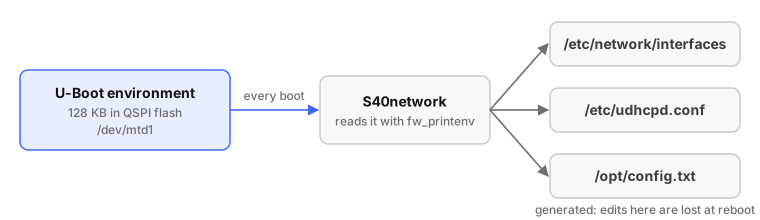
(/dev/mtd1, "qspi-uboot-env", per /etc/fw_env.config.) So:
- Editing
/etc/network/interfacesdoes not survive a reboot. - Defaults are compiled into the script.
"ipaddr" not definedstill means 192.168.2.1. - Address settings survive reflashing the SD card, including
./devkit flash --target factory --all.
| Variable | Default if unset | What it sets |
|---|---|---|
ipaddr_eth |
(unset) | The Ethernet socket. Set it for a static address; leave it unset for DHCP. |
netmask_eth |
255.255.255.0 |
The Ethernet netmask, used only when ipaddr_eth is set |
ipaddr |
192.168.2.1 |
The board's own address on the USB cable (usb0) |
ipaddr_host |
192.168.2.10 |
The single address the board's DHCP server hands your PC over USB |
netmask |
255.255.255.0 |
The USB netmask |
hostname |
the contents of /etc/hostname: fishball |
The hostname, and therefore the mDNS name fishball.local |
usb_ethernet_mode |
rndis |
USB Ethernet flavour: rndis, ncm or ecm |
ethaddr |
(stored in the environment) | The Ethernet MAC; Linux uses it for eth0 with patch 0013 |
ssid_wlan, pwd_wlan, ipaddr_wlan |
(unset) | A USB Wi-Fi dongle, if you fit one |
S40network writes iface eth0 inet static when ipaddr_eth has a value and
iface eth0 inet dhcp otherwise, so "back to DHCP" means deleting
ipaddr_eth.
Editing uEnv.txt on the SD card does nothing
U-Boot imports it into its RAM environment only (env import, no saveenv),
and this U-Boot has no network stack (# CONFIG_NET is not set). Linux's
fw_printenv reads /dev/mtd1. An edit that seemed to work did so because
192.168.2.1 is also S40network's built-in default. Use Route 1 or Route 3.
A static address has no gateway and no DNS
On Buildroot the static branch writes only address and netmask, and nothing
writes /etc/resolv.conf. The board reaches its own subnet and nothing else:
libiio is unaffected, but git, wget and anything that resolves a name fail.
DHCP sets both (udhcpc's default.script).
A DHCP reservation is usually the right answer
Leave ipaddr_eth unset and have your router always give this board the same address.
For a static address with internet access on Buildroot:
# run from: the board
cat >> /mnt/jffs2/autorun.sh <<'EOF'
ip route add default via 192.168.1.1
echo "nameserver 192.168.1.1" > /etc/resolv.conf
EOF
/mnt/jffs2is Buildroot's only writable, persistent partition.autorun.shruns at every boot after the network is up and survives reflashing: it is the first place to look when the board does something the source cannot explain (troubleshooting).- On Debian
autorun.shis never run: use a drop-in file or a systemd unit next tofishball-identity.service.
The router shows a MAC address instead of a name
| symptom | the router lists the board by MAC, and a DHCP reservation is impossible |
| cause | the name a router lists comes from DHCP option 12, which stock udhcpc does not send; stock firmware also picks a random MAC every boot (macb e000b000.ethernet: invalid hw address, using random) |
| fix | firmware/patches/0013 adds both to the generated stanza, below. The Debian rootfs does the same in its fixed file |
# /etc/network/interfaces as generated with patch 0013
iface eth0 inet dhcp
    hostname fishball
    hwaddress ether 00:0a:35:00:01:22
The MAC is the ethaddr variable (omitted if unset). A static stanza gets
hwaddress but not hostname, so the router lists a pinned board by MAC;
fishball.local works either way.
Running two boards on one network?
Check they do not share an ethaddr; fw_setenv ethaddr <mac> changes one.
What DHCP exposes
| Direction | Exposure |
|---|---|
| Outbound | everything (with DHCP's gateway). No service on the board uses it |
| Inbound from the internet | no route in behind ordinary NAT. The addresses are private and the kernel has no IPv6 stack |
| Inbound from your LAN | wide open, and there is no packet filter on the board |
| Port | Service | Authentication |
|---|---|---|
| 22/tcp | dropbear, root shell | password analog, the documented default |
| 30431/tcp | iiod |
none |
| 80/tcp | httpd, the info page | none; discloses serial, MACs, kernel and firmware versions |
| 5353/udp | avahi (mDNS) | n/a |
| 67/udp | udhcpd | limited to usb0 by its config, so it does not serve your LAN |
Anyone who reaches port 30431 can tune, receive and transmit
Isolate the board on a separate VLAN or behind the router's firewall. A static address keeps it off the internet.
A changed root password does not survive a reboot on Buildroot
Unless you copy /etc/{passwd,shadow,group} to /mnt/jffs2/etc/ with a
matching password.md5, which S21misc checks before restoring them.
Logging in without a password
# run from: the repo root
./devkit ssh-key            # idempotent; --check reports whether it is done
ssh fishball
~/.ssh/fishball |
an ed25519 key used for nothing else |
the board's /root/.ssh/authorized_keys |
the public half, mode 600, root-owned |
~/.ssh/config |
a Host fishball block, appended without touching what is already there |
The key is dedicated because the board has a published root password. The last
step logs in with BatchMode=yes, so a pass proves the key works. The password
stays enabled; on Debian, turn it off only after key login is proven:
# run from: the board - Debian only, and ONLY after key login is proven
echo 'PasswordAuthentication no' > /etc/ssh/sshd_config.d/no-password.conf
systemctl restart ssh
A typo there locks you out
Recovery means taking the card out: logind is masked, so there is no
systemctl reboot, and the console needs the FTDI DEBUG cable.
If you have locked yourself out
On Buildroot, in order of effort:
- the USB cable and
fw_setenv(unless you changedipaddrtoo); config.txt(Route 2);- the serial console at 115200 baud and
fw_setenv; - the U-Boot console (Route 3).
Reflashing the SD card does not help: the addresses are in QSPI flash.
The environment can reset itself
U-Boot is built with CONFIG_MISC_INIT_R, and if MIO 10 reads low at boot
it restores the compiled-in defaults: every fw_setenv value (ethaddr,
hostname, ipaddr_eth, tx_quiesce) is gone, with one line on the serial
console as the only notice. MIO 10 reads high on this board, but nothing
guarantees it. Symptom: a board that has forgotten its settings and takes a
random MAC every boot.