Flashing the board, and checking what it runs
Every way to get a build onto the board, how to confirm the board runs it, the USB ports and the BOOT switch. For the tasks, see put the firmware on a card, put your build on the board and check what it runs. Build first: Building your own firmware.
Never flash with DFU on this board
It has bricked units, and it cannot replace BOOT.bin at all.
Key facts
./devkit flashrewrites the running board's own SD card: backed up, md5-checked before the swap, about 40 s with the reboot.- The old files stay on the card as
*.prevand on your disk infirmware/.flash-backups/<stamp>/. ./devkit verify --boardis what proves the board runs your build.- The BOOT switch must be in SD mode (
0 0): a board in QSPI mode ignores the card, which looks exactly like a failed build.
Which way to flash
| When | Updates BOOT.bin (the bitstream)? |
|
|---|---|---|
C: ./devkit flash |
most of the time; the board is running | yes |
| A: SD card | the board no longer boots, or a new Debian card | yes |
| C2: a second card | trying a BOOT.bin you are unsure of |
yes, on the spare card |
| D: JTAG | trying FPGA changes in seconds; gone at power-off | no |
| B: DFU | never on this board | no |
Option C — over SSH, from the running board (no card removal)
If the board still boots, it rewrites its own SD card: mount the FAT boot partition, replace the files, reboot. This is the only remote option that updates the FPGA bitstream.
# run from: the repo root
./devkit flash              # BOOT.bin + uImage
./devkit flash --target factory --all   # every file on the boot partition (factory target only)
./devkit flash --boot-only  # BOOT.bin only: an HDL or bitstream change
./devkit flash --kernel-only
./devkit flash --dtb-only
./devkit flash --target factory --kernel-only  # the Linux 5.15 build
It backs up the current files, checks the md5 of each new file on the board
before swapping it in, unmounts cleanly and reboots (about 40 seconds). The
previous files stay on the card as *.prev and on your disk in
firmware/.flash-backups/<stamp>/.
| A new kernel that… | Undo it by |
|---|---|
| does not boot | putting the .prev file back from a card reader |
| boots but misbehaves | another --kernel-only |
- Which build:
firmware-modern/output/by default (the devkit setsFW_OUTPUTfortools/flash.sh);--target factoryflashesfirmware/output/. The file names are the same, so the flag is the only difference. --alland--rootfs-onlyare refused for the modern target: the Debian root cannot be swapped over the network. Write a card (Option A).- On Buildroot
/dev/mmcblk0p1is unmounted; on Debian it is already mounted at/boot../devkit flashhandles both.
By hand, the same steps:
# run from: firmware/ on your host (BOARD is the running board)
BOARD=root@192.168.2.1

# 0. Find the boot partition: /boot on Debian; on Buildroot, mount it at /tmp/sd.
SD=$(ssh $BOARD 'findmnt -n -o TARGET -S /dev/mmcblk0p1 || { mkdir -p /tmp/sd && mount /dev/mmcblk0p1 /tmp/sd && echo /tmp/sd; }')
echo "$SD"

# 1. Back up what is on the card now. This is your way back.
ssh $BOARD "cat $SD/BOOT.bin" > BOOT.bin.rollback
ssh $BOARD "md5sum $SD/BOOT.bin"
md5sum BOOT.bin.rollback                      # the two must match

# 2. Copy the new file in beside the old one, and check it before swapping.
scp output/BOOT.bin $BOARD:$SD/BOOT.bin.new
ssh $BOARD "md5sum $SD/BOOT.bin.new"          # must match: md5sum output/BOOT.bin

# 3. Swap, flush, reboot. (If you mounted /tmp/sd yourself, unmount it before rebooting.)
ssh $BOARD "cd $SD && cp BOOT.bin BOOT.bin.prev && mv BOOT.bin.new BOOT.bin && sync && reboot"
Do the backup step
A bad BOOT.bin means the board does not boot, and recovery then needs a card
reader. Check the md5 before the mv and keep the rollback copy until the new
firmware has proved itself.
Option A — SD card (always works)
A 128 MB FAT partition for the four boot files, an ext4 partition with the
unpacked Debian root, and a uEnv.txt that boots from it. One command does all
of it (it runs firmware-modern/debian/write-card.sh):
# run from: the repo root. DESTROYS everything on the card
./devkit write-card --dry-run /dev/sdX    # checks the device, writes nothing
sudo ./devkit write-card /dev/sdX
Check the device name yourself
It refuses non-removable disks, but this command can destroy data you care about.
One FAT32 partition, five files.
# run from: firmware/
cp output/{BOOT.bin,devicetree.dtb,uEnv.txt,uImage,uramdisk.image.gz} /path/to/sd-card/
With no clone and nothing installed: put write-card.cmd from the release next
to its other files and double-click it. It makes the same two partitions (the
root as ext3, which the kernel mounts with its ext4 driver) and backs up the
card first. Step by step: writing the card on Windows.
Then eject, insert, power-cycle. If the board comes up with old firmware or not at all, check the BOOT switch is in SD mode.
Option C2 — a second card, when you do not want to risk the first
The safest way to try a BOOT.bin you are unsure of (a new FSBL especially) is
to boot a different card:
# run from: the repo root, with a blank card in a reader
./tools/make-sd-card.sh /dev/sdX --dry-run            # check the target first
./tools/make-sd-card.sh /dev/sdX --boot-bin /path/to/BOOT.bin
- It writes the factory layout (one FAT32 partition, five files, Buildroot RAM disk). Power off, swap cards, power on; if it fails, swap back.
- It refuses anything but a removable USB/MMC whole disk, a disk holding
/or/home, or a mounted one, and makes you type the device name back. - It also gives you the spare bootable card every recovery note here assumes.
Option D — JTAG (temporary, but the fastest HDL loop)
JTAG is a hardware debug interface that loads a bitstream straight into the FPGA in seconds.
| lasts | until power-off (volatile); BOOT.bin is not updated |
| cable | the debug port (JTAG is interface 0), and keep the USB 2.0 port connected too: the debug port powers the board and the USB port carries the network |
| D1, halted at U-Boot | quick; fine if the AXI topology has not changed |
| D2, full JTAG bootstrap | robust: initialises the PS for the new bitstream |
One-time setup, in a real terminal on the machine the board is plugged into
(sudo needs a TTY; rules installed in a VM do not affect the host). Without
it Vivado reports ERROR: [Labtoolstcl 44-199] No matching targets found:
# run from: anywhere, on your host
sudo cp /tools/Xilinx/Vivado/2022.2/data/xicom/cable_drivers/lin64/install_script/install_drivers/*.rules \
        /etc/udev/rules.d/
sudo udevadm control --reload-rules
sudo udevadm trigger
Replug the debug cable; the USB node should show crw-rw-rw-. In Vivado,
open_hw_manager; connect_hw_server; get_hw_targets; open_hw_target;
get_hw_devices
should list the Digilent cable, then arm_dap_0 xc7z020_1.
Never program while Linux is running
Its drivers are bound to the old programmable logic (PL, the FPGA half of the chip), and swapping it hangs the system.
D1. Quick: halted at U-Boot. Open the debug UART, power-cycle, press a key
within 3 s to stop at Pluto>. Program with Hardware Manager → Auto Connect
→ right-click xc7z020_1 → Program Device, or:
# run from: the Vivado Tcl console on your host (any directory; the path is absolute)
open_hw_manager
connect_hw_server
open_hw_target
current_hw_device [get_hw_devices xc7z020_1]
set_property PROGRAM.FILE \
  {<repo>/firmware/src/hdl/projects/pluto/pluto.runs/impl_1/system_top.bit} \
  [current_hw_device]
program_hw_devices [current_hw_device]
Then type boot at Pluto>. Success prints End of startup status: HIGH;
LOW means the bitstream did not load. The PS↔PL level shifters (PS: the ARM
half) were set up for the previous bitstream, which is usually fine if the AXI
topology has not changed; otherwise use D2.
D2. Robust: full JTAG bootstrap (ADI's flow; initialises the PS for the new
bitstream). ps7_post_config must come after the bitstream, because it enables
the level shifters and releases the PL resets:
# run from: firmware/src/hdl/projects/pluto on your host, as: xsdb run-jtag.tcl
connect
target 2
rst
source ps7_init.tcl
ps7_init
fpga -f pluto.runs/impl_1/system_top.bit
ps7_post_config
dow ../../../u-boot-xlnx/u-boot
con
When the design works, rebuild and flash with Option A or C so it persists.
If things go wrong: recovering the factory firmware
The distributor publishes the factory firmware:
OpenSourceSDRLab/PlutoSky_7020_AD936X_SDR,
byte-identical to a working unit's SD card (provenance). Copy
it onto a FAT32 card as in Option A. Keep a
local copy before experimenting.
Verify your build is actually running
# run from: the repo root
./devkit verify                                   # modern: is the build sane?
./devkit verify --board                           # ...and is the board running it?
./devkit verify --target factory                  # factory: is the build sane?
./devkit verify --target factory --board          # ...and is the board running it?
./devkit verify --target factory --require-board  # the same, but FAIL if the board is stale or unreadable
./devkit verify --target factory checks that firmware/output/'s five files are present and
not trivially small, that the bitstream is compressed (an uncompressed one
overflows the FSBL's on-chip memory and BOOT.bin silently fails to boot), and
that timing is met, then prints what is in the design:
== FPGA design ==
  PASS  utilization report present
        DSP48s 94 / 220   Slice LUTs 12521 / 53200
        -> decimator on BOTH RX channels (default)
        block design: no rx_ddc
        RX decimator: both channels (patch 0021)
== bitstream ==
  PASS  compressed (2371856 B < 3.9 MB uncompressed)
== timing ==
  PASS  no failing setup endpoints
        WNS 0.215 ns over 54211 endpoints
STOCK_RX_FILTER=1 gives 72 / 220 and decimator on RX channel 0 only; the
optional channelizer gives 96 / 220 with rx_ddc (Fs/4 shifter) is wired in.
It exits non-zero on failure. For the modern target, firmware-modern/verify_dtb.py
audits the built device tree against sixteen checks (CI runs it on every push).
--board reports, it does not fail
It mounts the board's card and compares every file against output/ by
checksum, because a card holding a different build of the same size looks
entirely normal. It reports without changing the exit status; use
--require-board in a script that must fail on a stale card.
On the board, cat /opt/VERSIONS prints device-fw <git-hash> plus one line
per component (on Debian, every installed package). Upstream firmware says
fw_version=v0.38, so a git hash means your own build. iio_info shows the
same fw_version, and hw_model should read FISH Ball PlutoSDR Rev.A
(Z7020-AD9361).
Which USB port is which
| USB 2.0 (OTG) port | Debug port | |
|---|---|---|
| Enumerates as | 0456:b673 Analog Devices, typically /dev/ttyACM* (-if03) |
0403:6010 Digilent Adept, two /dev/ttyUSB* |
| Gives you | Network over USB (192.168.2.1), libiio, mass storage, a console |
JTAG (-if00) and the board's real UART console (-if01) |
| Available | Only after Linux boots | From power-on |
For serial, use the debug port
It shows FSBL → U-Boot → kernel → login, even when the board fails to boot.
# run from: anywhere, on your host
ls -l /dev/serial/by-id/
#  ...Digilent_Adept_USB_Device_<serial>-if00-port0 -> ttyUSB0   <- JTAG
#  ...Digilent_Adept_USB_Device_<serial>-if01-port0 -> ttyUSB1   <- console
screen /dev/serial/by-id/usb-Digilent_Digilent_Adept_USB_Device_<serial>-if01-port0 115200
Log in as root / analog (change it with device_passwd); exit screen
with Ctrl-A then k, y. SSH (ssh root@192.168.2.1) needs the USB 2.0
port or Ethernet; the debug port carries no network.
Boot modes (BOOT DIP switch)
The two-position BOOT switch, next to RST between the USB2.0 and
DEBUG ports, picks the boot source at power-on. 1 means toward the ON
marking.
Change it only with the board off
Boards ship in SD mode, which the devkit needs (the distributor's write-up says QSPI; check the switch).
| Mode | SW1 | SW2 | What it does |
|---|---|---|---|
| SD card | 0 (GND) |
0 (GND) |
Boots BOOT.bin from the microSD card: factory default, what the devkit needs |
| QSPI flash | 1 (VCC3V3) |
0 (GND) |
Boots from the onboard 16 MiB flash instead |
| JTAG | 1 (VCC3V3) |
1 (VCC3V3) |
Debugging and flashing over JTAG |
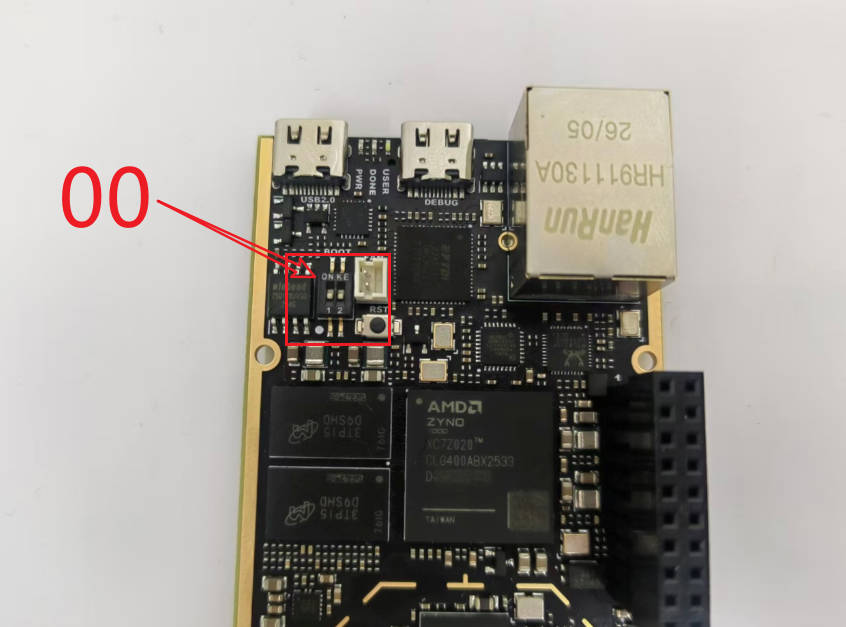
0 0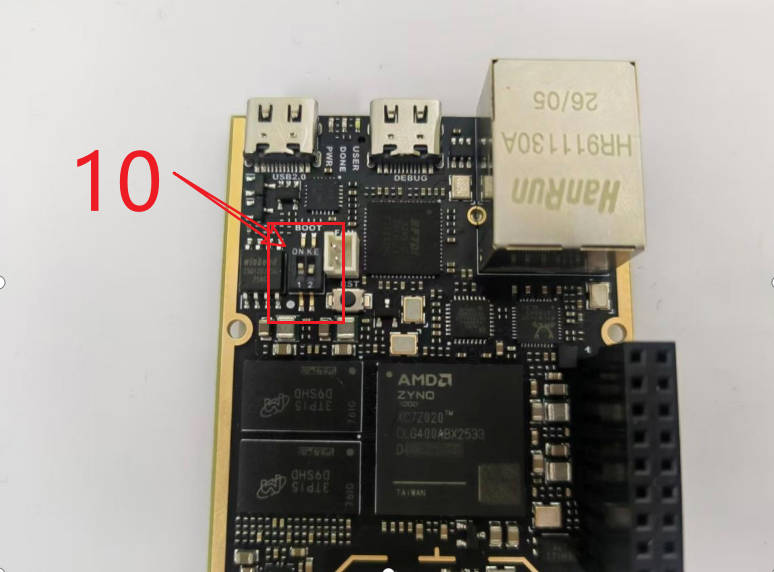
1 0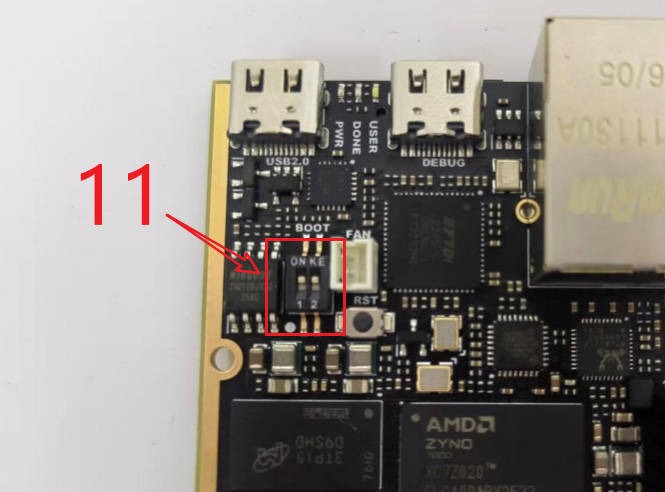
1 1Photographs from the distributor's PlutoSky R1 write-up.
- SD boot never writes the QSPI flash.
- A board in QSPI mode ignores the card, which looks exactly like a failed build.
| LED | Meaning |
|---|---|
PWR |
Power present |
DONE |
FPGA configured (Vivado's End of startup status: HIGH) |
USER |
Driven by Linux; on these builds it follows the transmitter (tx-active trigger), the factory firmware blinks a heartbeat (how to control it) |